---
title: How to customise your search for a Rental CMA Report
description: "This article is intended to help you customise and refine your search results for a Rental CMA Report. Step 1: Select the \"Rental CMA Report\" tab from the..."
---
[Skip to content](https://help.hutly.com/buddybee/how-to-customise-your-search-for-a-rental-cma-report-#main-content)
English - Australia
Show submenu for translations
[More support](https://help.hutly.com/kb-tickets/new?hsLang=en-au)
[.png?width=150&height=85&name=Hutly_RGB_MainLogo_Landscape_Black%20(5).png)](https://hutly.com/?hsLang=en-au)
- [Sign in](https://au.hutly.com/)
- [Contact us](https://hutly.com/adlforms/contact)
Open main navigation
Close main navigation
- [Sign in](https://au.hutly.com/)
- [Contact us](https://hutly.com/adlforms/contact)
- English - Australia
Show submenu for translations
- [More support](https://help.hutly.com/kb-tickets/new)
- Contact us
Contact us
How can we help you?
- There are no suggestions because the search field is empty.
1. [Hutly Knowledge Base](https://help.hutly.com/?hsLang=en-au)
2. [Property Data](https://help.hutly.com/property-data?hsLang=en-au)
3. [CMA (Sales & Rental)](https://help.hutly.com/property-data?hsLang=en-au#cma-sales-rental)
# How to customise your search for a Rental CMA Report
This article is intended to help you customise and refine your search results for a Rental CMA Report.
**Step 1: Select the "Rental CMA Report" tab from the toolbar**

**Step 2: Start typing the target property address into the top search bar and select the property from the drop down box**
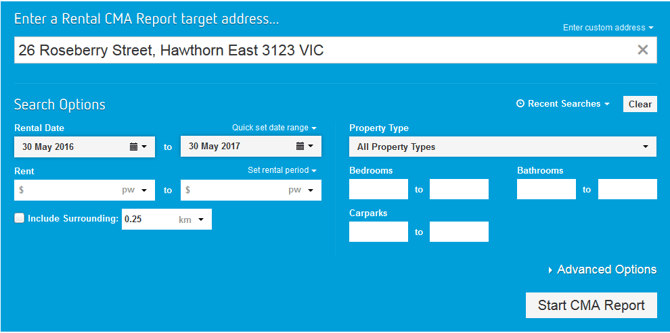
If the property does not appear in the list, you can enter a custom address by clicking "Enter custom address"

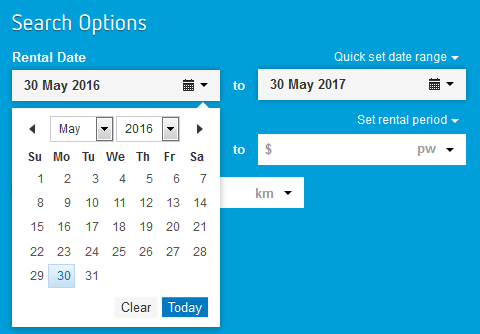
**Step 3: Select the date range using the calendars below**
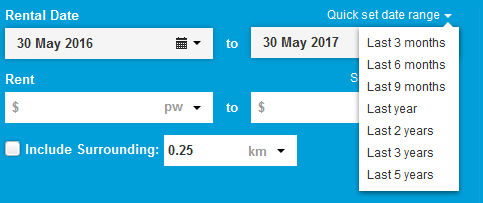
You can also select common date ranges from the "Quick set date range" drop down menu
**Step 4: Select a price range and radius surrounding the target property to include in your search**

Please note that you can enter any custom radius by typing it in manually rather than selecting a common radius from the drop down menu

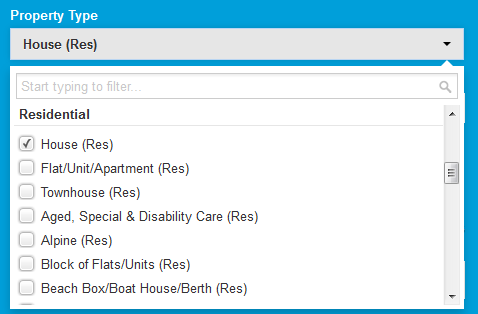
S**tep 5: Select the types of property to search for**
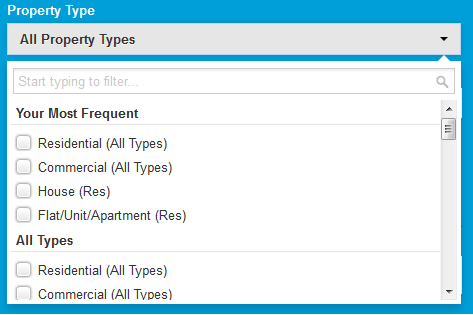
There are many types of property to narrow your search with. For example you can search for all residential properties or exclusively houses.
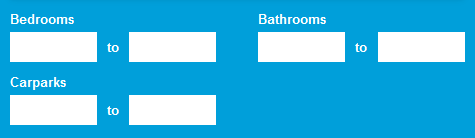
**Step 6: Add the number of bedrooms, bathrooms and carparks to search for**
If you fill in both boxes with the same number, it will only search for properties with that number of bedrooms, bathrooms or carparks.
If you leave the first box blank and fill in the second, it will search for properties with between 0 up to your maximum
If you fill in the first box and leave the second box blank, it will search for properties with your minimum and above
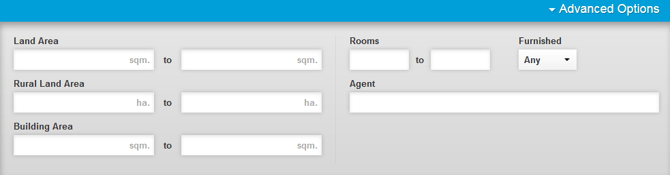
**Step 7: Add any advanced search criteria such as land area or number of rooms by clicking on "Advanced Options"**
**Step 8: Click on "Start CMA Report" and proceed to** [How to select results in a Rental CMA Report](https://help.hutly.com/buddybee/how-to-select-results-in-a-rental-cma-report-?hsLang=en-au)
- [Hutly](https://help.hutly.com/hutly?hsLang=en-au#main-content)
- [Agentic AI](https://help.hutly.com/hutly?hsLang=en-au#agentic-ai)
- [Workspaces \[Forms\]](https://help.hutly.com/hutly?hsLang=en-au#workspaces-forms)
- [eSigning](https://help.hutly.com/hutly?hsLang=en-au#esigning)
- [ADL Forms](https://help.hutly.com/hutly?hsLang=en-au#adl-forms)
- [VicForms](https://help.hutly.com/hutly?hsLang=en-au#vicforms)
- [Property Data](https://help.hutly.com/property-data?hsLang=en-au#main-content)
- [CMA (Sales & Rental)](https://help.hutly.com/property-data?hsLang=en-au#cma-sales-rental)
- [Statement of Information (SOI)](https://help.hutly.com/property-data?hsLang=en-au#statement-of-information-soi)
- [Search & Mapping](https://help.hutly.com/property-data?hsLang=en-au#search-mapping)
- [Market Insights](https://help.hutly.com/property-data?hsLang=en-au#market-insights)
- [API & Data Feeds](https://help.hutly.com/property-data?hsLang=en-au#api-data-feeds)
- [Mobile App](https://help.hutly.com/property-data?hsLang=en-au#mobile-app)
- [Result Reporting](https://help.hutly.com/property-data?hsLang=en-au#result-reporting)
- [Account & Platform](https://help.hutly.com/account-platform?hsLang=en-au#main-content)
- [Getting Started](https://help.hutly.com/account-platform?hsLang=en-au#getting-started)
- [Hutly Credits](https://help.hutly.com/account-platform?hsLang=en-au#hutly-credits)
- [Subscription & Pricing](https://help.hutly.com/account-platform?hsLang=en-au#subscription-pricing)
- [Hutly Settings](https://help.hutly.com/account-platform?hsLang=en-au#hutly-settings)
- [Property Data Settings](https://help.hutly.com/account-platform?hsLang=en-au#property-data-settings)
- [Security & Compliance](https://help.hutly.com/account-platform?hsLang=en-au#security-compliance)
- [Troubleshooting](https://help.hutly.com/account-platform?hsLang=en-au#troubleshooting)
- [Sign in](https://au.hutly.com/)
- [Contact us](https://hutly.com/adlforms/contact)
[-1.png?width=150&height=85&name=Hutly_RGB_MainLogo_Landscape_Black%20(3)-1.png "Hutly_RGB_MainLogo_Landscape_Black (3)-1")](https://help.hutly.com/?hsLang=en-au)
[mailto:email@email.com](mailto:email@email.com)
Copyright © 2026, Hutly Pty Ltd