---
title: VicForms - Accessing VicForms through Hutly platform
description: Vic Forms can be accessed via the BuddyBee platform - our revolutionary new platform giving you access to the cutting edge of technology in real estate....
---
[Skip to content](https://help.hutly.com/buddybee/accessing-vic-forms-through-the-buddybee-platform-#main-content)
English - Australia
Show submenu for translations
[More support](https://help.hutly.com/kb-tickets/new?hsLang=en-au)
[.png?width=150&height=85&name=Hutly_RGB_MainLogo_Landscape_Black%20(5).png)](https://hutly.com/?hsLang=en-au)
- [Sign in](https://au.hutly.com/)
- [Contact us](https://hutly.com/adlforms/contact)
Open main navigation
Close main navigation
- [Sign in](https://au.hutly.com/)
- [Contact us](https://hutly.com/adlforms/contact)
- English - Australia
Show submenu for translations
- [More support](https://help.hutly.com/kb-tickets/new)
- Contact us
Contact us
How can we help you?
- There are no suggestions because the search field is empty.
1. [Hutly Knowledge Base](https://help.hutly.com/?hsLang=en-au)
2. [Hutly](https://help.hutly.com/hutly?hsLang=en-au)
3. [VicForms](https://help.hutly.com/hutly?hsLang=en-au#vicforms)
# VicForms - Accessing VicForms through Hutly platform
Vic Forms can be accessed via the Hutly platform - our revolutionary new platform giving you access to the cutting edge of technology in real estate.
Simply log in at **[au.hutly.com](https://au.hutly.com/)**. Once logged in, click **“My Forms”** from the top left drop down menu to go directly to the VicForms you know, and to view your contracts, data, and in-flight agreements.
Rest assured, VicForms remains fully available and supported. Your data, forms, and contracts remain securely hosted with Hutly. They are compliant with Victorian law and accessible at any time via your Vic Forms account.
Please note that “VicForms 2.0” is not supported by Hutly. Your existing data, team settings, and in-flight agreements are only available via **Vic Forms on [au.hutly.com](https://au.hutly.com/)**.
If VicForms doesn’t load correctly, you may need to perform a hard reload or clear your browser cache. [Here’s our step-by-step guide](https://help.hutly.com/buddybee/performing-a-hard-reload-/-clear-cache?hsLang=en-au).
When logging in to VicForms you will be presented with the *Overview* page.
The *Overview* page will show your completed and in progress contracts.
From here you can open a contract by clicking on the specific contract.
Contracts
The *Contracts* tab will display all contracts that are currently available in the account
Snippets
The *Snippets* tab is where you can find any custom text snippets that you can create to make entering large amounts of repeated text more streamlined/easy/hassle-free
### Search
On any page you can use the search box to find specific items
On the *Overview* and *Contracts* tabs this will search contracts by the name of your contracts
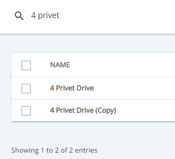
Note- the *Snippets* tab search, will look up the name and body text within your snippets.
- [Hutly](https://help.hutly.com/hutly?hsLang=en-au#main-content)
- [Agentic AI](https://help.hutly.com/hutly?hsLang=en-au#agentic-ai)
- [Workspaces \[Forms\]](https://help.hutly.com/hutly?hsLang=en-au#workspaces-forms)
- [eSigning](https://help.hutly.com/hutly?hsLang=en-au#esigning)
- [ADL Forms](https://help.hutly.com/hutly?hsLang=en-au#adl-forms)
- [VicForms](https://help.hutly.com/hutly?hsLang=en-au#vicforms)
- [Property Data](https://help.hutly.com/property-data?hsLang=en-au#main-content)
- [CMA (Sales & Rental)](https://help.hutly.com/property-data?hsLang=en-au#cma-sales-rental)
- [Statement of Information (SOI)](https://help.hutly.com/property-data?hsLang=en-au#statement-of-information-soi)
- [Search & Mapping](https://help.hutly.com/property-data?hsLang=en-au#search-mapping)
- [Market Insights](https://help.hutly.com/property-data?hsLang=en-au#market-insights)
- [API & Data Feeds](https://help.hutly.com/property-data?hsLang=en-au#api-data-feeds)
- [Mobile App](https://help.hutly.com/property-data?hsLang=en-au#mobile-app)
- [Result Reporting](https://help.hutly.com/property-data?hsLang=en-au#result-reporting)
- [Account & Platform](https://help.hutly.com/account-platform?hsLang=en-au#main-content)
- [Getting Started](https://help.hutly.com/account-platform?hsLang=en-au#getting-started)
- [Hutly Credits](https://help.hutly.com/account-platform?hsLang=en-au#hutly-credits)
- [Subscription & Pricing](https://help.hutly.com/account-platform?hsLang=en-au#subscription-pricing)
- [Hutly Settings](https://help.hutly.com/account-platform?hsLang=en-au#hutly-settings)
- [Property Data Settings](https://help.hutly.com/account-platform?hsLang=en-au#property-data-settings)
- [Security & Compliance](https://help.hutly.com/account-platform?hsLang=en-au#security-compliance)
- [Troubleshooting](https://help.hutly.com/account-platform?hsLang=en-au#troubleshooting)
- [Sign in](https://au.hutly.com/)
- [Contact us](https://hutly.com/adlforms/contact)
[-1.png?width=150&height=85&name=Hutly_RGB_MainLogo_Landscape_Black%20(3)-1.png "Hutly_RGB_MainLogo_Landscape_Black (3)-1")](https://help.hutly.com/?hsLang=en-au)
[mailto:email@email.com](mailto:email@email.com)
Copyright © 2026, Hutly Pty Ltd